
Petrifilm™ Plate Manager

Overview
Petrifilm™ Plate Manager is a fully integrated hardware and software system for high-volume food safety labs — automating microbial testing analysis, reducing labor time, and minimizing human error across regulated environments where accuracy and consistency are required.
Company
Neogen/3M
Product
Petrifilm™ Plate Manager
Role
UX Design Lead
Year
2022-2024
Platform
Desktop PC application
Objective
Design an MVP that simplifies workflows, standardizes outcomes across technicians, and improves confidence in results.
What we delivered
As the sole UX design lead, I designed a content-aware software system that gives technicians real-time visibility into run status, progress, and results — reducing workflow interruptions through guided error resolution and structured review states that improved traceability and lab throughput.
How we got there
Followed a research-led process by understanding lab techs in their environment to validating core workflows prior to the launch date.
Research ➜ Discover ➜ Define ➜ Ideate ➜ Design ➜ Validate
Research
Target audience
High-volume food safety testing labs, food and beverage manufacturing facilities, and third-party contract labs that produce more than 100K samples annually.


Proto-personas
Established a foundation for user experience based on real-world insights, addressed key user pain points provided from customer feedback, support tickets, and sales reports.
Primary user – Microbiology Lab Technician

Proto-Persona 01
Sarah Martinez
Microbiology Lab Technician
- Complete testing efficiently without sacrificing accuracy
- Reduce repetitive manual data entry
- Minimize counting and transcription errors
- Quickly locate historical test results
- Spend more time on analysis, less on admin
- Fast result entry and validation
- Clear workflows with minimal clicks
- Automated result capture where possible
- Confidence that data is accurate and traceable
- Easy access to previous samples and test records
- Manual colony counting is time consuming
- Recording results across multiple systems creates duplicate work
- Handwritten notes can be difficult to track later
- Switching between spreadsheets and lab software interrupts workflow
- High sample volume increases risk of mistakes
- Results entered once and available everywhere needed
- Sample information automatically linked to test results
- Less time spent on documentation and reporting
- Fewer transcription errors across the full workflow
Secondary user – Food Safety Laboratory Manager

Proto-Persona 02
Shannon Anderson
Food Safety Laboratory Manager
- Increase laboratory throughput
- Reduce operational risk
- Maintain compliance and audit readiness
- Improve staff productivity
- Standardize processes across technicians
- Visibility into testing volumes and performance
- Reliable and traceable data management
- Automated reporting capabilities
- Reduced dependence on manual workflows
- Integration with existing laboratory systems
- Manual processes limit scalability
- Inconsistent data entry creates quality concerns
- Difficult to identify trends across testing programs
- High labor costs associated with repetitive tasks
- Training new technicians requires significant effort
- More samples processed with the same staff
- Faster turnaround times
- Consistent results across technicians
- Easier audit preparation
- Data that supports operational decisions
Discover
Guerilla user testing
Through moderated usability testing with real customers, we validated behaviors and system workflows using a high-fidelity software prototype paired with a hardware prototype.
Customer sessions
During the conference, we conducted guerilla usability testing with several key clients. This gave us an opportunity to receive immediate in-the-moment feedback.


2
Full workdays
17
Real-world customers
10
Minute testing sessions


78%
of participants
Initially had trouble loading plates and need help getting started.
High Barrier to Entry: Nearly 4 out of 5 users struggle with the physical action of loading plates and require initial guidance.
Create an onboarding walkthrough for plate loading to get users started
50%
of participants
Will need tech-support for Laboratory Information Management System (LIMS) integration.
Technical Integration Gap: Half of the participants cannot integrate with their Laboratory Information Management System (LIMS) independently.
Standardize LIMS with self-service configuration wizard (out of scope)
50%
of participants
Are currently adding barcode labels to each plate manually.
Manual Inefficiency: Half of the users are still manually labeling barcodes.
Automated barcode generation (out of scope)
Define
Core pain points
Friction shared by technicians and lab managers
Inconsistent workflow & manual setup
Inconsistency in how tests are run and recorded can cause errors and lower confidence in results.
Fragile workflow continuity
Without clear recovery paths or visibility, technicians are forced to restart or guess at fixes.
Ambiguous results
A lack of contextual information makes it difficult for technicians to interpret results accurately or feel certain that a task is truly complete.
Problem statement
Lab technicians using Petrifilm Plate Manager struggle with inconsistent test execution and hard-to-recover errors — often only discovering mistakes after a full run. Without in-context guidance or clear workflow visibility, they lack confidence in their results and lose time to repeated runs. The ideal outcome is a guided workflow that surfaces errors early, supports recovery in the moment, and gives technicians real-time confidence in their process.
Design Challenge
How might we give lab technicians real-time guidance and error recovery so they can execute tests confidently and trust their results?
Ideate
Design goals
To address these challenges, we are focusing on these core design goals to provide guidance, continuity, and visibility.
1
Efficiency and Standardization
Minimize manual configuration by utilizing presets and automated inputs. This ensures high-volume processing stays consistent across all technicians, regardless of experience level.
Guided workflows
2
Operational Resilience
Eliminate workflow fragility by allowing users to pause and resume tasks without data loss. Provide clear, actionable feedback that empowers technicians to resolve errors independently and stay on the ‘happy path’.
Error & Recovery handling
3
Informed Completion
Prioritize critical information at the point of need to reduce cognitive load. By surfacing only what is relevant to the current task, we ensure high confidence in final validation and successful completion.
Review & Validate results
Collaborative ideation
Facilitated collaborative ideation sessions using Miro to align cross-functional stakeholders—including R&D and Sales—on product vision. This collaborative wireframing approach streamlined feature prioritization and ensured the MVP addressed both technical constraints and primary business objectives.
Collaboration tools:


Design
Building an MVP
We focused on developing a Minimum Viable Product (MVP) that addressed core user needs while maintaining a lean development cycle.
User interface design (UI)
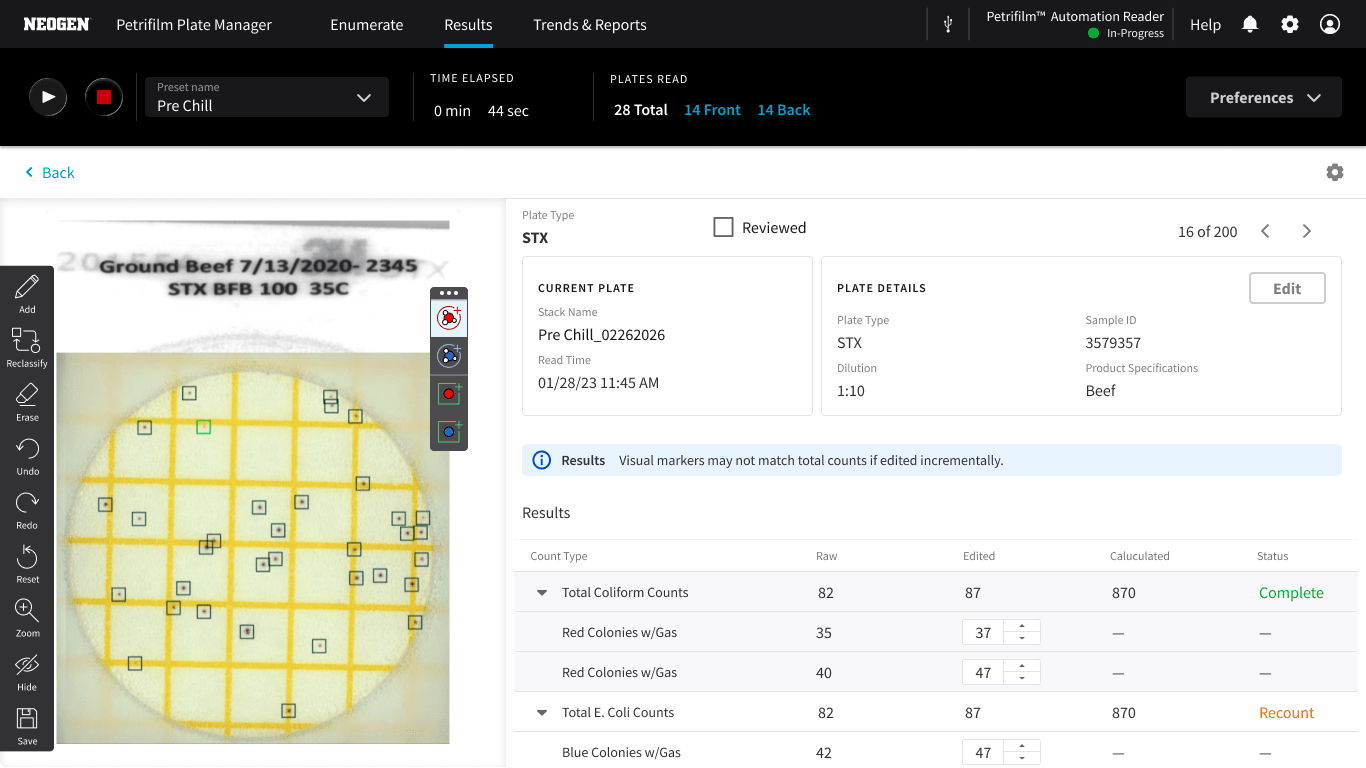
We leveraged reusable code and updated components to streamline the build process, ensuring consistency across the platform. The design system evolved to support the requirements of automated lab environments, creating a balance between legacy users with future users.

Shared functionality and architecture
The Petrifilm Plate Manager software acts as the centralized software hub; shares core communication protocols and APIs to connect with both the hardware and LIMS for both the Petrifilm Plate Reader Advanced and the Petrifilm Automated Feeder.


Side-by-side views of legacy and new software

Validate
User Acceptance Testing (UAT)
Validating all workflows before launch the product launch. Using 5 key workflows we invited 6 participants, internal experts (customer success, microbiologists & engineers).
What we recorded from UAT sessions


Initiate plate runs
Fast setup with minimal input
Observations
- Users need a more explicit first action or system prompt—unclear starting cues increase cognitive load on entry.
50% of users needed help to get started despite the system being ready.
Review results
Clear outputs with high confidence
Observations
- Plate images and details could be larger or zoomable to support quick identification.
- The system should explicitly display to users all incomplete plates instead of requiring guesswork.
33% of participants encountered unexpected system errors during result review.
Handle exceptions
Resolve issues without breaking workflow
Observations
- The system should diagnose device maintenance by providing clear next steps to prevent workflow interruption.
- Key transition points require guidance to support continuous workflow.
- Exception handling should reduce cognitive load for technicians.
100% of participants struggled to locate the correct plates when handling exceptions.
Continue batch processing
Support uninterrupted, high-volume processing
Observations
- Users need clear guidance to continue processing plates.
100% of participants hesitated or were unsure how to respond when the input bin is empty.
Respond to notifications
Surface issues without disrupting focus
Observations
- Display actionable next steps to reduce reliance on tech support.
- Users require contextualized errors to reduce confusion and improve trust in the system.
100% of participants experienced workflow interruptions when errors occurred.
System Usability Scale Score (SUS)
The chart shows how 7 individual users rated the system, plus an overall average.
Usability testing of the end-to-end flow returned an average SUS score of 62.71 across 7 participants — placing the experience in the "High Marginal" range and below the 68-point threshold considered acceptable.
While the majority of participants scored at or above 62.5, two users scored 50 or below, indicating friction significant enough to impede task completion. These results point to specific breakdowns in the flow rather than broad systemic issues, and suggest targeted design iteration is needed before the experience is ready for wider release.

10 issues across 3 themes
To understand what was driving the SUS score of 62.71, the results were synthesized into three themes that pointed to systemic gaps
— in how device states were communicated, how errors were handled, and how core interaction patterns held up under real use conditions.
Cross-device status inconsistency
Theme 1
The PPRA, R5, and software don't share a unified status language, leaving users unable to interpret system state during errors and transitions.
Issues (2):
- Suction cup failure: PPRA showed green, R5 showed blue, software showed red — three conflicting states with no shared meaning. The error couldn't be dismissed, blocking the user entirely.
- Boot state not reflected in software: During startup, PPRA and R5 both show blue but software shows a generic "connected" state in white — no indication the PPRA is still booting. Users have no visibility into whether the system is ready to use.
Error handling that blocks rather than guides
Theme 2
Errors either prevent users from proceeding, use technical language without recovery paths, or surface at the wrong time.
Issues (4):
- Non-dismissible error state: A suction cup failure produced an error in software that couldn't be cleared, leaving users with no path forward.
- Unfriendly modal messaging: A software failure surfaced a technical error code with no actionable guidance. A secondary dialog interrupted the flow mid-task without clear context.
- PAF vacuum sensor failure (R5 only): Error dialog asked users to check the device, but hardware and software states weren't synchronized — not enough context to act with confidence.
- Toast banners surfacing at wrong moments: Notifications appeared during active work rather than at natural transition points, competing with task-critical information.
Broken interaction patterns
Theme 3
Core UI behaviors didn't work as expected, undermining user confidence in the system.
Issues (4):
- Inconsistent error toast sizing: Toasts appeared at different sizes within the same session — signals design system gaps and erodes trust.
- Grid view scroll broken: Scrolling only worked when the scrollbar itself was directly selected. Users couldn't scroll the page naturally, blocking them from browsing multi-plate results.
- Default preset logic ignores user type: New users saw a pre-selected preset instead of a zero state. Returning users didn't see their last-used preset. Stack names were auto-generated before a preset was chosen, creating data artifacts before the user made any intentional choices.
- Wrong default view on R5: Software defaulted to single-plate view instead of grid view when connected to R5, mismatching user expectations for multi-plate workflows.
OUtcome
A walk-away solution
Petrifilm™ Automated Feeder introduces hands-free plate feeding. Allows technicians to continue other tasks reducing idle time between steps. The system runs in the background, automatically interpretating and sorting plates. The automated feeder can process up to 300 plates in approximately 33 minutes.
The software application was developed as part of the Petrifilm™ automation package and supports core tasks such as plate identification with barcode scanning, automated colony counting, and data capture. It integrates with existing laboratory information management systems (LIMS) and reduces reliance on manual data entry—helping ensure accuracy, traceability, and repeatability in regulated lab environments.
Types of Petrifilm Plates
AI Trained Plate Identification. The current system utilizes 11 individual algorithms, specifically trained to identify each plate type.


